Your agents do the work. You make the calls.Your agents do the work.You make the calls.
Modus is a desktop app that runs Claude Code and Kiro CLI around your real work: the task you were given, a branch in every repository it touches, the pull requests, the CI that broke and the review that asks for changes. When an agent needs you, it waits in one inbox.
Free, for macOS on Apple Silicon and for Debian or Ubuntu Linux
Modus
What needs you, in one place
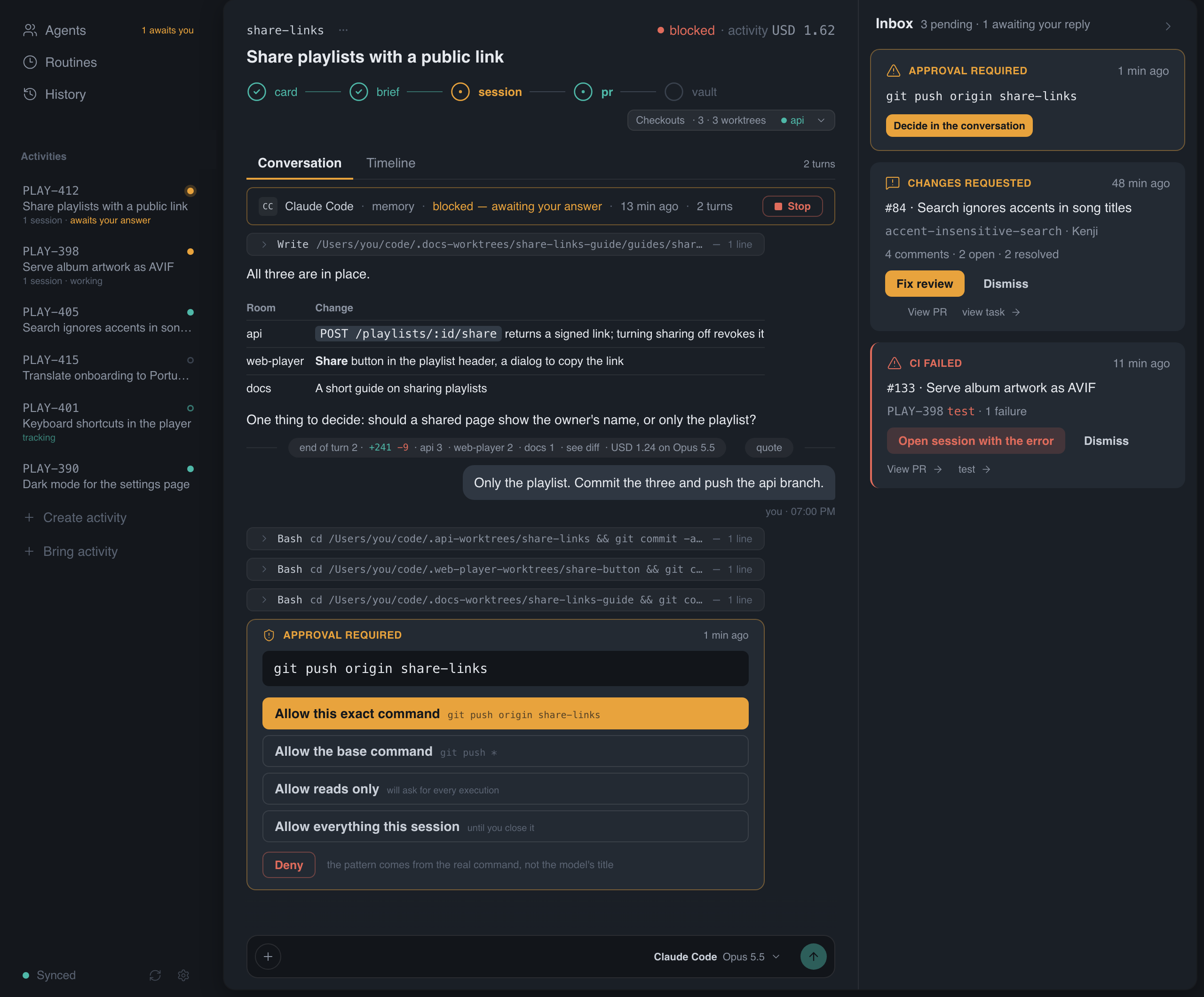
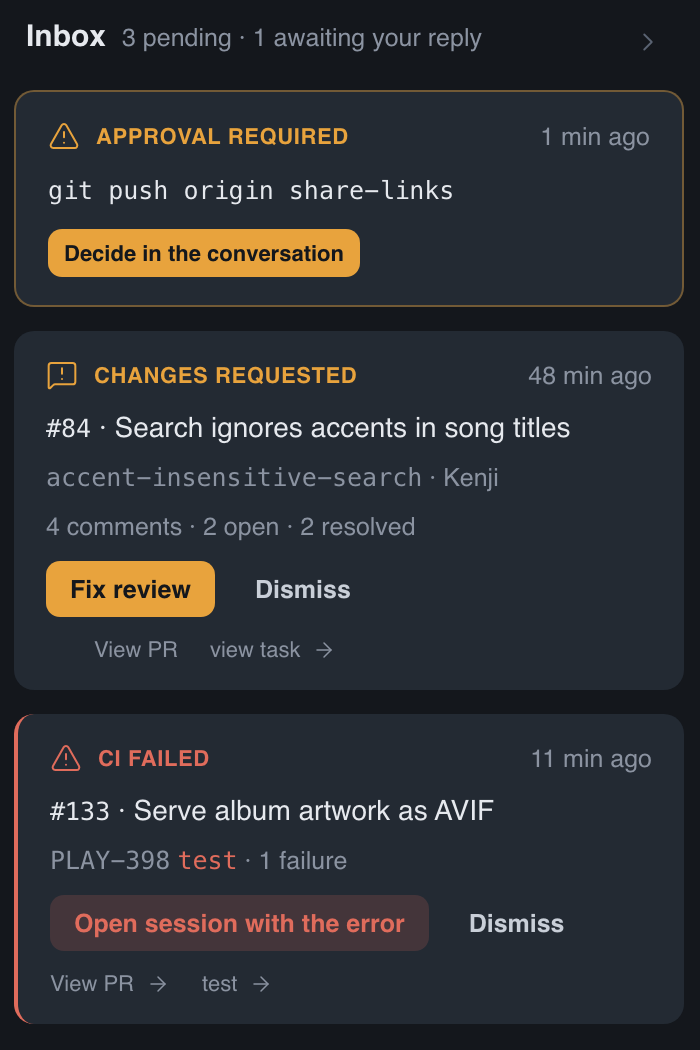
Agents ask, CI fails, reviewers ask for changes. Modus turns each of those into a card you can act on, and keeps everything else out of your way.
A shell command waits for your approval, once, for this pattern, or for the session.
A review asking for changes comes with every comment, ready for an agent to fix.
A failed pipeline arrives with the failing step and its log.
When the task changes in your issue tracker after work started, the change shows up as an update you can pass to the agent.
One conversation for every repository
Real work rarely stays in one repository. A task keeps one conversation, and each branch it touches is a room: its own git worktree, its own rules, its own color in the thread.
The agent reads any room, and enters one before changing it.
Opening a new worktree always asks you first.
Your own clone is never switched or touched.
Every change, traced to the turn that made it
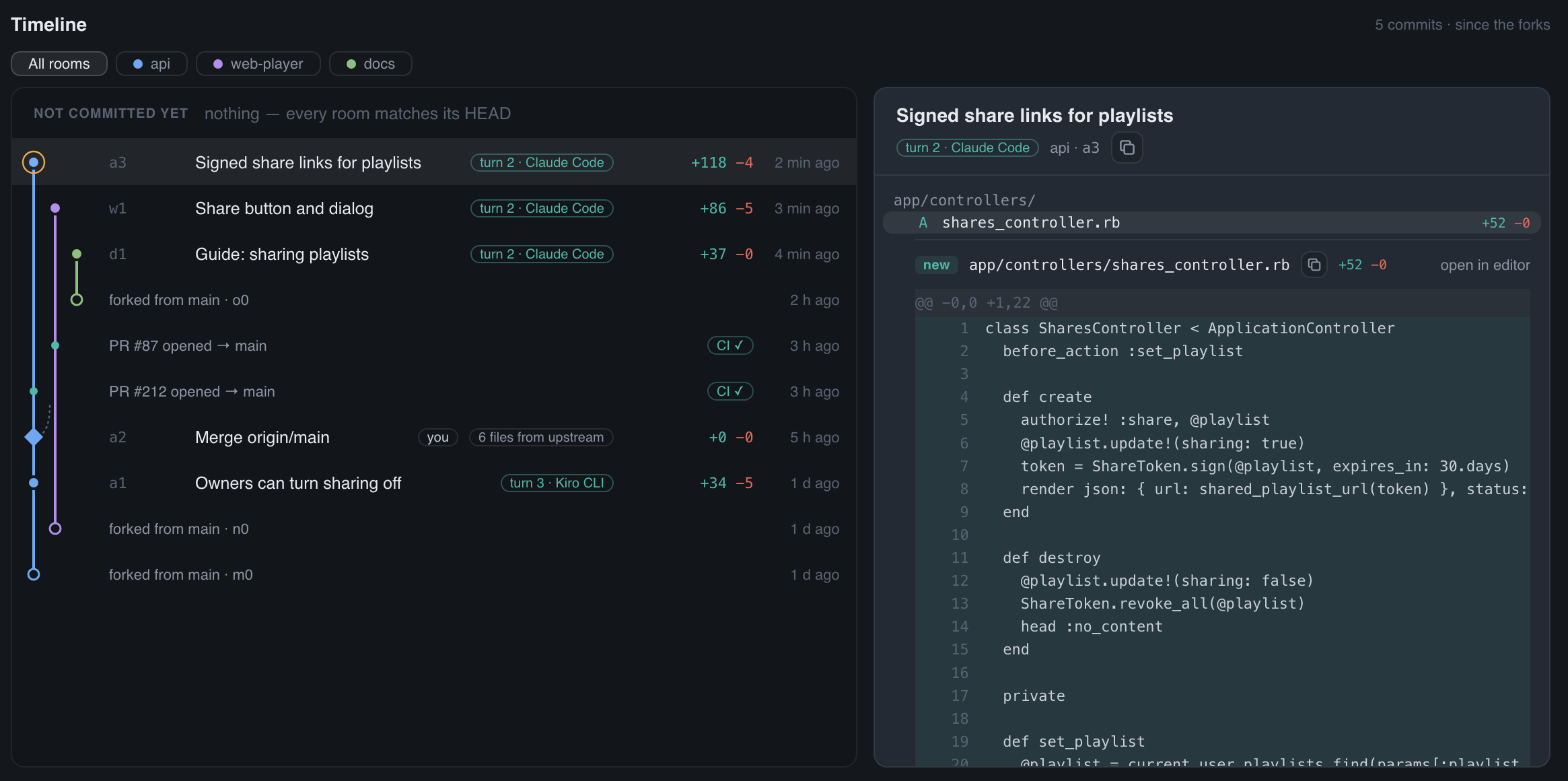
The Timeline reads each room’s history from git: what is not committed yet, every commit since the branch was born, and the merges from main with the conflicts they resolved.
A commit an agent wrote shows the turn that made it, Claude Code or Kiro.
Every room on its own lane, side by side.
Open any commit to read its diff, file by file.
Start from the task, not from a blank prompt
Tasks assigned to you in your issue tracker arrive with a brief written from the task itself: its description, fields, links and attachments. A session starts from that brief and the task’s memory, and you choose how it begins.
Planning first: the agent reads and proposes a plan, and changes nothing until you approve it.
Analyze first: one read-only turn that reports what it found.
Comment first: your own words go with the launch.
Claude Code or Kiro CLI, and the model, for each session.
PLAY-415Translate onboarding to Portuguese
Launching Claude Code on web-player
Reads the brief written from the task
Reads the task’s memory: decisions, hand-offs, earlier sessions
Creates a worktree for onboarding-pt
Plans first, and waits for your OK
Bring the agents you already pay for
Modus runs Claude Code and Kiro CLI as they are installed on your machine, signed in to your own accounts, with your skills, commands and settings. It does not resell model access or add a markup: what a session costs is what your provider charges, and Modus shows that cost on every turn.
From install to the first session
Install and sign inOpen Modus and sign in with Google to create your profile on this computer.
Connect your workPoint Modus at the folder with your repositories, and connect your issue tracker, GitHub or Bitbucket if you use them.
Pick a taskChoose a task, read the brief Modus wrote from it, and launch a session.
Coming soon
Planned, not in the app yet.
More agents
Codex, Gemini CLI and other command-line agents, next to Claude Code and Kiro.
More issue trackers
GitHub Issues and Linear, so tasks come from wherever your team keeps them.
Windows
The same app on Windows, after macOS and Linux.
Updates that ask
New versions offered inside the app, installed only when you say so.
Sign in with Microsoft
For teams whose accounts live there.
Your work stays on your machine
Modus has no server and collects no telemetry. Your code, tasks and conversations live on your disk; Modus talks to Google, your issue tracker, GitHub and Bitbucket directly from your computer, with credentials kept in your system keychain. What an agent reads goes to the AI provider you chose, under your account. The privacy policy has the details.
Questions
Is Modus free?
Yes. Modus itself costs nothing. You pay your AI provider for what your agents use, as you do today.
Which platforms does it run on?
macOS 12 or later on Apple Silicon, and Debian or Ubuntu Linux on amd64. Windows is coming.
Which agents can it run?
Claude Code and Kiro CLI today. You need at least one of them installed and signed in, plus git.
Do I need an issue tracker?
No. You can create tasks by hand, and Modus also picks up your pull requests on GitHub and Bitbucket.
Will an agent push or merge on its own?
Shell commands ask for your approval unless you allowed them, and Modus never merges a pull request for you. You decide what gets committed, pushed and merged.
Does my code leave my computer?
Only through the agent you run: Claude Code or Kiro send what they read to Anthropic or AWS, under your account and their terms. Modus itself has no server; it reads your tracker, GitHub and Bitbucket from your computer and keeps everything there.
Modus is in a closed beta and opens to everyone soon.
Want to know when it does, or try the beta? Write to [email protected].